

Finnair Customer Care: Contact Channels, Chat & Phone Support
To contact Finnair customer care, access the official customer service portal on Finnair’s official website, initiate a session via Finnair digital chat, or call the regional phone number assigned to your country or language. Finnair provides country-specific phone lines, localized operating hours, dedicated digital request forms, and in-app messaging. For routine modifications—such as adding baggage, selecting seats, downloading boarding passes, or checking operational flight updates—using Finnair’s digital self-service tools is significantly faster than waiting in phone or chat queues.
Editorial Note: Farewander is an independent travel information and flight comparison platform, not Finnair, and not an authorized customer service agency for the airline. Farewander cannot access airline reservation databases, reissue electronic tickets, process refunds, or alter seat assignments. All booking adjustments, claims, and inquiries must be submitted directly through Finnair’s official support channels or through the travel agency that issued your ticket.
How to Contact Finnair Customer Service
Finnair maintains several distinct customer service channels depending on whether your inquiry is urgent, routine, or related to post-flight compensation:
| Support Channel | Recommended Inquiries |
|---|---|
| 1. Manage Booking & Finnair App | Seats, baggage, check-in, date changes |
| 2. Finnair Digital Chat | General inquiries, rebooking assistance |
| 3. Regional Telephone Desks | Complex ticketing, urgent cancellations |
| 4. Online Request & Claim Forms | Refunds, EC 261 disruption claims |
| 5. Airport Service Desks | Same-day delays, gate issues, boarding |
| 6. Social Media Channels | General flight notices & travel updates |
- Finnair Website & Manage Booking: Primary hub for self-service flight modifications, ancillary purchases, and receipt retrieval.
- Finnair Digital Chat: Embedded on the bottom corner of the Finnair website and inside the mobile app. The virtual assistant answers common policy questions 24/7, with live human customer-care agents available during designated regional operating hours.
- Regional Phone Support: Direct telephone hotlines distributed across global operational markets. Opening hours and call charges vary by country.
- Official Contact and Request Forms: Specialized, authenticated web forms designed for processing ticket refunds, special assistance accommodations, lost property reports, and formal service complaints.
- Finnair Mobile App: Integrated messaging, operational push notifications for gate changes, and itinerary self-management.
- Airport Ground Staff: Stationed at check-in desks, Bag Drop zones, and transfer desks at Helsinki Airport and global destinations for same-day travel emergencies.
- Social Media: Public operational updates posted via official channels on platforms like X (formerly Twitter) and Facebook.
Before Contacting Finnair: Try These Self-Service Options
Before calling or waiting in live chat queues, check whether your request can be completed directly through Finnair's online tools:
- Finnair Manage Booking: Retrieve your reservation using your six-character booking reference and family name to update contact details, change eligible flight dates, select seats, or cancel tickets.
- Finnair Online Check-in: Check in 36 hours prior to departure (24 hours for flights to/from the United States) and download digital boarding passes.
- Finnair Flight Status: Track day-of-travel operations, runway movements, de-icing delays, and terminal gate changes.
- Finnair Baggage Allowance: Review carry-on dimensions, Superlight fare rules, and prepay for checked luggage at discounted advance rates.
- Finnair Seat Selection: View cabin layouts and reserve Extra Legroom or front-row seating.
- Finnair Cancellation and Refund Policy: Review fare family conditions (Superlight, Light, Classic, Flex) before submitting voluntary cancellation requests.
Can I Manage My Finnair Booking Online?
Yes. Passengers holding confirmed tickets issued directly by Finnair can perform most operational changes online via Finnair Manage Booking or on the official Finnair Manage Booking portal.
Through Manage Booking, you can:
-
Review your confirmed flight times, aircraft equipment, and terminal details.
-
Change flight dates and departure times on eligible Classic and Flex fares.
-
Purchase advance baggage allowances and pre-order inflight meals.
-
Add Advance Passenger Information (APIS) and passport credentials.
-
Enter your Finnair Plus or oneworld frequent-flyer membership number.
-
When Self-Service Is Restricted: Manage Booking will block voluntary structural changes if your ticket was purchased through an independent travel agency, if your itinerary combines different airline ticket stocks, if your booking was upgraded using Avios or tier benefits, or if the flight has already been marked as cancelled in airline dispatch. In such situations, contact your original booking agent or Finnair customer care directly.
Finnair Customer Service by Phone
Finnair does not operate a single, centralized global telephone number. Instead, phone assistance is routed through regional contact centers listed on the official customer care page.
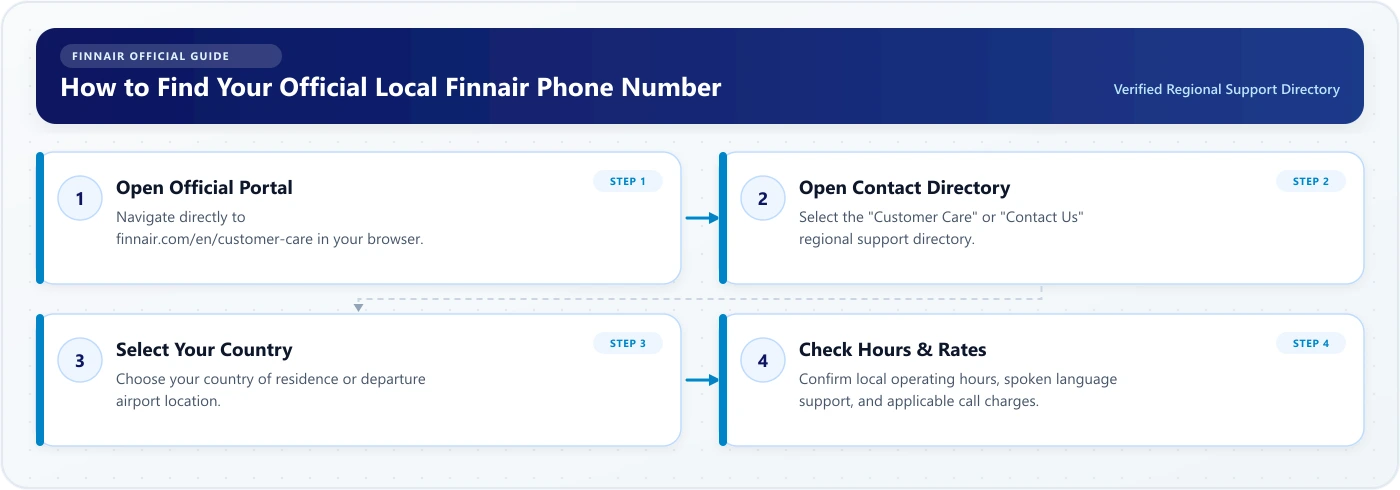
Important Phone Guidelines
- Operating Hours Vary: Calling desks in Finland, the United Kingdom, and the United States frequently maintain extended or 24-hour English-language availability, whereas local-language desks (e.g., French, German, Japanese) operate exclusively during standard regional business hours.
- Network & Service Charges: Local numbers may be subject to standard domestic network rates, while international or long-distance numbers may incur roaming or carrier charges.
- Peak Disruption Influx: During major weather events or European airspace disruptions, phone queues experience severe delays. Use the Finnair app or Manage Booking for rebooking before dialing.
Finnair Live Chat Support
Finnair offers an interactive chat service on its website and within the mobile app:
- Sisu the Virtual Assistant: The automated chatbot handles baseline queries 24/7, including baggage size limits, check-in opening times, flight timetable lookups, and links to web forms.
- Human Agent Escalation: If the virtual assistant cannot resolve your problem, you can request a transfer to a live representative. Human support availability is subject to local agent staffing hours and language queues.
- Secure Rebooking: Chat agents can assist with flight changes and rebooking during operational disruptions, but complex changes requiring payment card details may require telephone verification.
How to Contact Finnair During a Flight Delay or Cancellation
When unexpected weather, air traffic control restrictions, or technical issues disrupt operations, Finnair initiates automated disruption workflows:
- Automated Notifications: Finnair dispatches flight status updates via SMS and email. Ensure your current mobile phone number (with country code) is saved in your reservation.
- Digital Rerouting in Manage Booking: If your flight is cancelled or delayed significantly, Finnair’s dispatch system automatically attempts to rebook you onto an alternative flight. Log into Finnair Manage Booking or the Finnair mobile app to review and accept the proposed travel plan or select an alternative flight.
- Care and Refreshment Vouchers: Under European air passenger regulations (EC 261/2004), passengers experiencing extended delays (typically 2 hours or more depending on route distance) are entitled to food and drink vouchers. Finnair issues electronic meal vouchers sent directly to your smartphone via SMS or linked to your digital boarding pass.
- Connecting Flights: If your delayed flight causes you to miss a connection booked under a single through-ticket, Finnair is legally responsible for rebooking you to your final destination and arranging overnight hotel accommodation if required. Passengers traveling on separately booked, independent tickets must resolve missed segments with the respective airline at their own expense.
How to Contact Finnair About Baggage
Baggage issues must be documented immediately through official channels before you depart the arrival terminal:
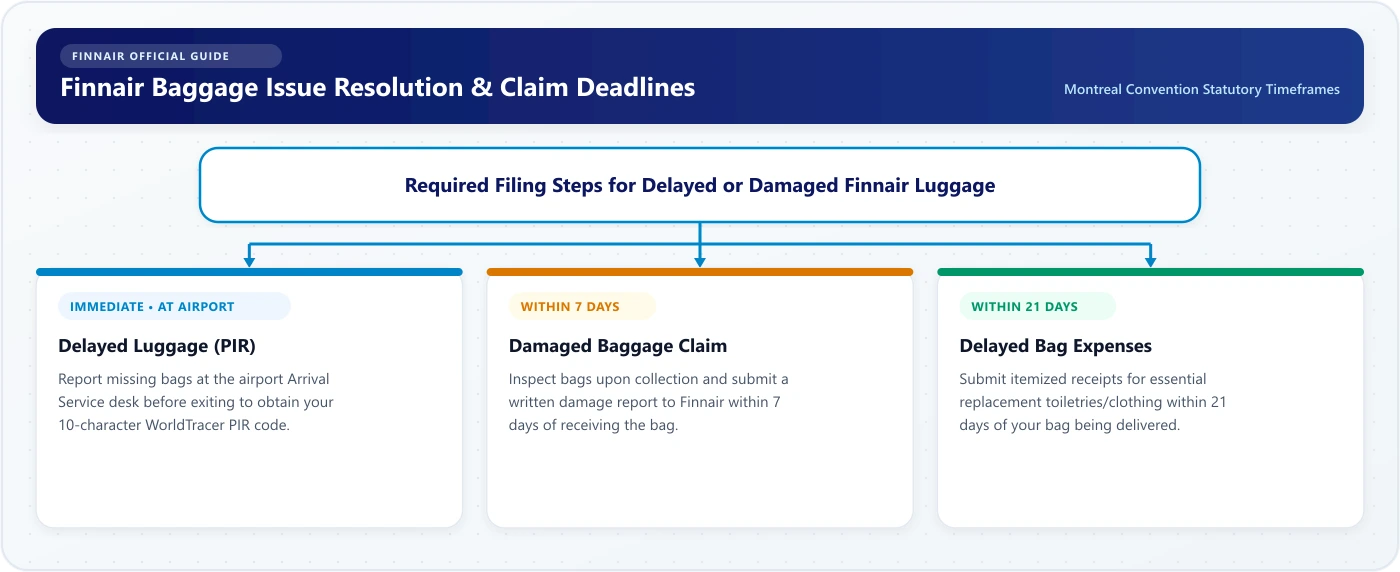
- Delayed Baggage (PIR Requirement): Report missing bags at the Finnair Arrival Service desk before leaving the airport to obtain a Property Irregularity Report (PIR) containing your unique 10-character file reference (e.g.,
HELAY12345). You can monitor the tracing process online via Finnair's WorldTracer portal. - Necessary Expenses Claims: If your luggage is delayed away from your home country, Finnair reimburses essential emergency purchases (toiletries and essential clothing). Retain all itemized receipts and submit an expense claim via Finnair's online baggage claim form within 21 days of receiving your luggage.
- Damaged Baggage: Visible damage to checked luggage must be reported at the airport or submitted in writing via Finnair's online feedback form within 7 days of delivery. Finnair does not accept liability for pre-existing flaws, overpacked bags, or standard cosmetic wear (scratches, small dents, broken pull-zippers).
How to Request Special Assistance from Finnair
Passengers requiring wheelchair transport, escort services, medical device accommodations, or assistance traveling with guide dogs must notify Finnair well in advance:
- 48-Hour Advance Requirement: Submit your assistance request at least 48 hours prior to scheduled departure to allow airport ground teams and station staff adequate time to allocate specialized equipment.
- How to Request: You can register assistance requests when booking your flight, afterward through Finnair Manage Booking, or by completing the dedicated special assistance web form on Finnair's website.
- Medical Clearance (MEDIF): Travelers with acute medical conditions, those requiring supplemental inflight therapeutic oxygen, or stretcher transport must have a medical professional complete Finnair’s Medical Information Form (MEDIF) for clearance by Finnair's medical desk prior to departure.
How to Contact Finnair About Refunds or Compensation
Finnair handles financial claims and ticket reimbursements strictly through structured web forms rather than general customer service email addresses:
1. Flight Ticket Refunds
- Voluntary Cancellations: If your ticket conditions permit cancellation, request your refund directly through Manage Booking.
- Airline Involuntary Cancellations: If Finnair cancels your flight and you decline the alternative itinerary offered, you are entitled to a 100% refund of unused ticket coupons. Submit your request via the official Finnair refund form. Refunds are processed back to the original form of payment (credit card, bank transfer, or Avios).
2. Disruption Compensation (EC 261/2004)
Passengers arriving at their final destination with a delay of three hours or more, or whose flights were cancelled without 14 days' notice, may be eligible for statutory compensation under European Regulation EC 261/2004, provided the disruption was not caused by extraordinary circumstances (such as extreme weather, military operations, or third-party air traffic control strikes).
Submit compensation claims via Finnair's dedicated Feedback and Claims form. Have your booking reference, flight numbers, ticket receipt, and bank details ready.
How to Submit a Complaint or Feedback to Finnair
If you experienced service shortcomings during your journey:
- Open the Feedback & Claims section on Finnair’s website.
- Select the relevant feedback category (inflight service, airport handling, cabin cleanliness, or ticketing).
- Input your passenger details, ticket number (beginning with
105), flight date, and route. - Attach supporting documents, boarding pass stubs, or receipts.
- Record your unique feedback reference number for future correspondence.
What If My Finnair Payment Failed?
If your payment fails during ticket purchase or when buying extra baggage online:
- 3D Secure / Bank Authorization: Most online transaction failures occur when the issuing bank declines the two-factor authentication (3D Secure) step. Verify mobile banking prompts or contact your card issuer.
- Alternative Payment Channels: Finnair supports credit/debit cards, regional internet banking, and mobile wallets. If one method fails, try an alternative card or complete the transaction inside the Finnair mobile app.
- Ticketing Time Limits: If your payment is interrupted after initial authorization, your reservation may be held under a temporary ticketing time limit. Verify whether you received an official e-ticket receipt; if no e-ticket arrives within two hours, contact customer care to complete ticketing before the inventory is released.
What If I Booked Through a Travel Agency?
If your Finnair ticket was purchased via an Online Travel Agency (OTA) such as Expedia, Booking.com, or a packaged tour operator:
- Ancillary Purchases (Seats & Bags): You can use Finnair Manage Booking to view your itinerary, pick seats, pay for baggage, and complete online check-in.
- Ticket Changes & Refunds: For date changes, route alterations, voluntary cancellations, or ticket refunds, you must contact the travel agency directly. Finnair does not hold control of third-party Global Distribution System (GDS) ticketing records prior to departure and cannot reissue agency-owned tickets.
Finnair Plus Customer Support
Members of the Finnair Plus loyalty program should use dedicated loyalty desks:
- Missing Avios & Tier Points: Claims for uncredited flight Avios can be submitted online using the "Claim Missing Avios" tool in your Finnair Plus profile up to six months after flight completion.
- Award Bookings & Upgrades: Queries regarding flight award seats, cabin upgrades with Avios, or tier benefit redemptions can be handled through the dedicated Finnair Plus member chat or phone queues.
- Profile Corrections: Legal name adjustments and frequent-flyer account mergers require identity verification through Finnair Plus support.
Can I Get Help at the Airport?
Airport service desks provide critical face-to-face assistance for day-of-travel issues:
- Check-in & Service Desks: Located in the departure hall to handle ticket reissues, oversized luggage processing, and pet travel paperwork.
- Transfer Service Desks: Positioned in both Schengen and non-Schengen zones at Helsinki Airport (HEL) to support transiting passengers facing tight or missed flight connections.
- Arrivals & Baggage Desks: Located in baggage reclaim halls to initiate Property Irregularity Reports for mishandled baggage. Note: Airport kiosks are designed for self-service check-in and luggage tag printing; they are not customer support terminals.
What Information Should I Have Ready Before Contacting Finnair?
To expedite your inquiry and prevent security validation delays, gather the following details before calling or opening a chat session:
- Six-character alphanumeric booking reference (PNR).
- 13-digit electronic ticket number (starting with
105). - Passenger family name exactly as entered on the ticket.
- Scheduled flight number (e.g.,
AY 1331) and travel date. - 10-character WorldTracer reference number (for baggage claims).
- Copies of receipts or hotel invoices (for expense reimbursements).
How to Avoid Fake Finnair Customer-Service Numbers
Airline customer support searches are a frequent target for search-engine advertising scams and fraudulent call centers:
- Always Use Official URLs: Navigate exclusively to https://www.finnair.com/ before dialing any telephone number or entering credentials.
- Never Share Passwords or OTPs: Official Finnair customer care agents will never ask for your email password, account PIN, or one-time two-factor authentication codes.
- Inspect Sponsored Search Results: Avoid clicking third-party ad listings that display toll-free numbers promising instant airline flight changes or cancellations.
- Never Transmit Card Details via Email: Finnair processes card payments through secure online payment links, not open email text.
Need Help with Farewander?
If you have questions regarding the Farewander website, flight search comparison features, or editorial feedback, contact the Farewander support team at support@farewander.com.
(Please note: Farewander is an independent flight comparison platform and cannot look up Finnair booking references, issue boarding passes, modify reservations, or resolve airline customer service claims.)
When contacting Finnair customer service, begin by selecting your specific country on Finnair's official contact portal to verify local phone numbers and operational hours. Use self-service tools like Manage Booking or the mobile app for routine seat and baggage updates, and submit formal refund or compensation requests through official web forms. Keep your six-character booking reference and travel documents ready, and verify all contact details directly on https://www.finnair.com/ to avoid fraudulent customer service numbers.