

Finnair Manage Booking: Change Flights, Seats & Baggage
To manage an existing Finnair reservation, access the official Manage Booking portal on Finnair’s website or open the Finnair mobile app. You can retrieve your itinerary by entering your six-character booking reference or 13-digit e-ticket number alongside the passenger’s family name (surname) exactly as stated on the ticket. Once logged in, travelers can view flight details, select or change seats, purchase extra baggage, update contact details, and, where fare rules allow, modify flight dates or cancel itineraries. Available self-service options depend on your specific ticket type, fare conditions, and whether your ticket was purchased directly from Finnair or through an independent travel agency.
Editorial Note: Farewander is an independent travel information and comparison platform, not Finnair or an airline reservation portal. Modifications, payments, and ticket cancellations must be executed directly through Finnair's official Manage Booking platform or through the original travel provider that issued your ticket.
How to Retrieve Your Finnair Reservation Online
Accessing your booking through Finnair’s self-service portal requires no account password. The system utilizes passenger validation data generated during ticketing.
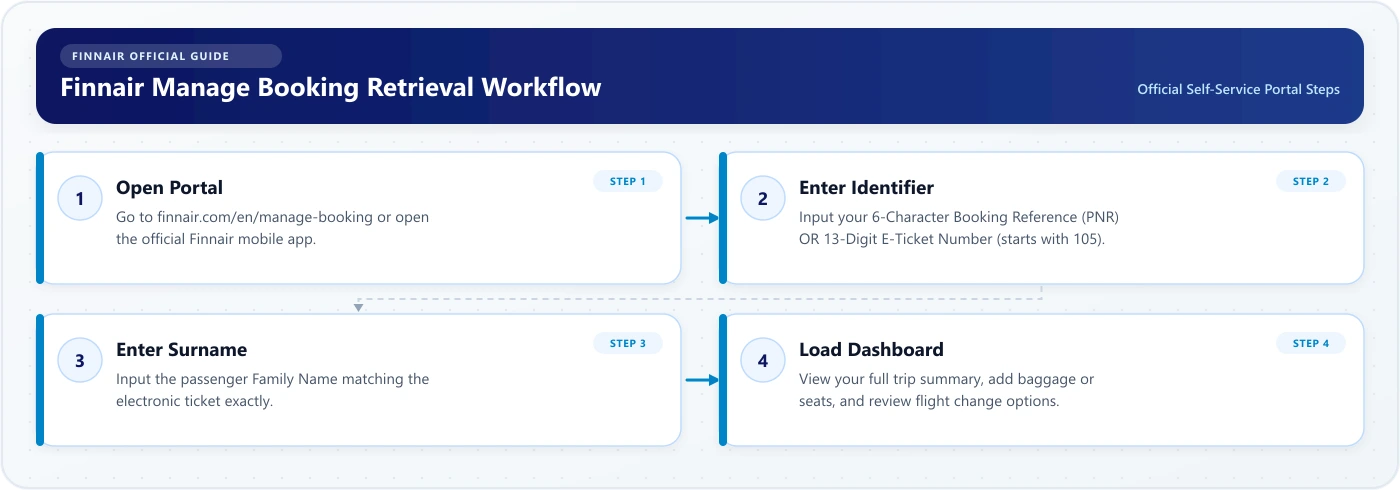
- Open Finnair Manage Booking: Navigate to the Manage Booking section on the Finnair desktop site, mobile site, or the Finnair smartphone app.
- Enter Your Booking Identifier: Type your six-character alphanumeric booking reference (e.g.,
Y8K2MN) or your 13-digit e-ticket number (which begins with Finnair’s airline code105). - Enter Your Family Name: Input the passenger's last name exactly as it appears on the booking confirmation email or e-ticket receipt. Do not include titles (such as Mr, Mrs, or Dr) unless they were accidentally merged into the surname field during initial reservation.
- Access Self-Service: Select the retrieval button to open your booking management dashboard.
- Review Available Actions: Review your travel segments, ticketing status, seat allocations, and contextual modification buttons.
What Can You Do With Finnair Manage Booking?
The features displayed within your Manage Booking dashboard depend heavily on your ticket class, booking channel, and departure timeline. While itinerary viewing is universal, structural ticketing changes are subject to specific fare conditions.
| Feature Category | Self-Service Actions Supported | Availability Conditions |
|---|---|---|
| Itinerary Management | View flight numbers, timetables, aircraft types, and terminal information. | Available for all confirmed direct and agency bookings. |
| Flight Changes | Change travel dates, flight times, or routes. | Subject to fare rules (typically Classic and Flex fares); directly issued tickets only. |
| Cancellations & Refunds | Cancel reservation and submit refund requests. | Dependent on fare conditions; unavailable for certain agency or multi-class tickets. |
| Seating | Select standard, preferred, Extra Legroom, or front-row seats. | Available where seats remain unassigned; charges vary by fare tier and status. |
| Baggage | Purchase additional checked bags or sports equipment in advance. | Available on Finnair- and Norra-operated flights prior to check-in closure. |
| Travel Extras | Pre-order meals, purchase onboard Wi-Fi packages, and buy lounge access. | Route-dependent; primarily available on Finnair-operated flights. |
| Passenger Details | Update mobile phone numbers, email addresses, and APIS/passport data. | Available for all passengers; does not permit transferring tickets to another traveler. |
| Loyalty Integration | Add or update your Finnair Plus or oneworld frequent-flyer number. | Available prior to flight check-in and boarding pass issuance. |
| Check-in Access | Transition directly to digital check-in when the departure window opens. | Standard window opens 36 hours prior (24 hours for U.S. flights). |
How to Change a Finnair Flight
If your travel plans shift, you can change your travel dates or flights online, provided your ticket conditions permit modifications.
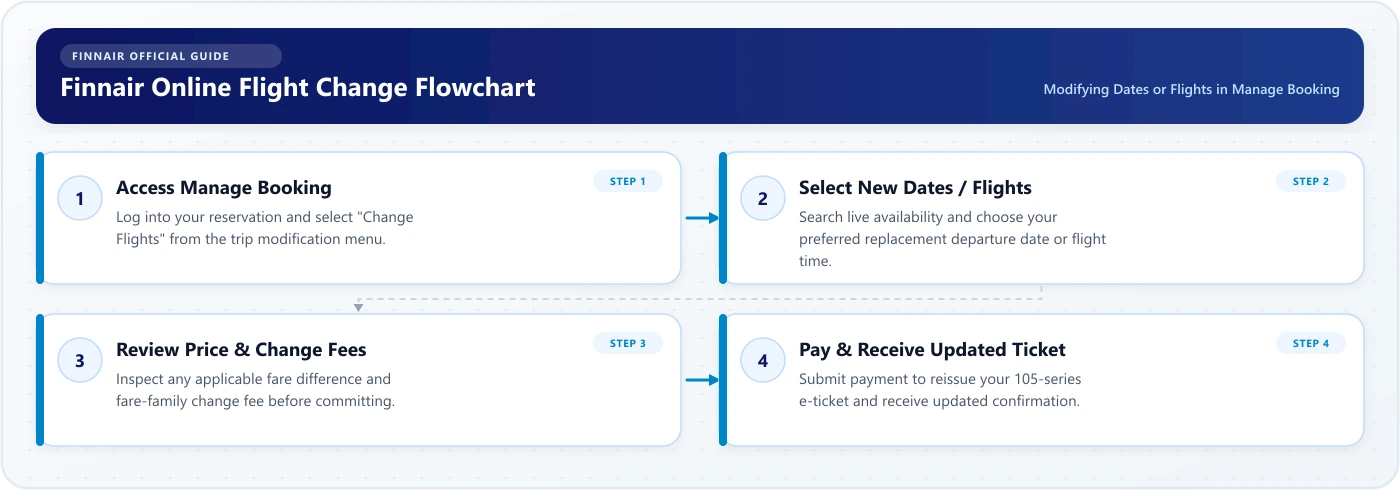
- Access the Reservation: Open Manage Booking using your booking reference and family name.
- Locate the Modification Button: Find the flight change option (often labeled "Change flight" or located under trip modification tools). If this button does not appear, your ticket type may prohibit online changes, or the booking may be managed by an external travel provider.
- Select Segments to Modify: Choose the specific outbound or inbound flights and dates you wish to alter.
- Review Alternative Flights: Select your preferred new travel date and flight schedule from the operational flight list.
- Review Price Differences and Fees: The system will calculate the fare difference between your original ticket and the new flight, alongside any applicable ticket-change penalties dictated by your fare rules.
- Confirm and Pay: Enter payment details to cover any remaining balance. Once the transaction completes, Finnair reissues your electronic ticket and dispatches an updated itinerary to your registered email address.
- Verify New Segments: Re-open your itinerary to verify that all new flight segments, dates, and connected travel extras (such as seats or special meals) transferred correctly.
Note: Changes must generally be finalized prior to the departure of the original flight segment. If you fail to change or cancel before departure, your ticket may be marked as a no-show, forfeiting its value.
When You Cannot Change a Booking Online
In several scenarios, the self-service flight change button will be disabled or will display a notice directing you elsewhere. Manage Booking cannot process changes if:
- Your Ticket Type Restricts Modifications: Restrictive promotional fares, including Economy Superlight and Light tickets, generally do not allow voluntary flight changes unless a flexible change option was purchased during booking.
- The Ticket Was Issued by a Travel Agency or Tour Operator: If you purchased through an Online Travel Agency (such as Expedia, Opodo, or Gotogate) or a packaged holiday provider, Finnair’s online tool cannot re-calculate or re-issue third-party agency tickets. You must contact the issuing agency directly to execute changes.
- The Itinerary Involves Multiple Cabin Classes: Tickets combining different commercial booking classes or multi-city open-jaw legs often require manual agent calculations.
- The Flight Was Upgraded: If a flight segment was upgraded to Premium Economy or Business Class using Avios, tier upgrade benefits, or cash, online modifications are disabled. Customer service must process the itinerary.
- The Flight is Already Cancelled in Finnair’s Operations: If an operational disruption occurs and your flight is formally cancelled by the airline, automated flight modification may lock. In these circumstances, follow the dedicated rebooking link sent via SMS/email or contact airport ground staff.
- The Reservation is an Award Booking or Group Booking: Group reservations (typically 10+ passengers) and partner-airline frequent-flyer award tickets require processing through the dedicated booking provider or partner loyalty desk.
How to Cancel a Finnair Flight Through Manage Booking
Cancelling a flight reservation online is a definitive, irreversible action.
- Log In to Manage Booking: Retrieve your reservation with your booking reference and family name.
- Select Cancellation: Navigate to trip modification options and select the cancel flight or request refund function.
- Choose Flights and Travelers: If your booking contains multiple passengers or legs, select whether you are cancelling the entire reservation or specific segments/travelers.
- Review Cancellation Breakdown: The portal will display your ticket conditions, identifying whether your fare is refundable, partially refundable, or non-refundable. Non-refundable fares may only return unused statutory government taxes and airport passenger charges.
- Confirm Cancellation: Confirm the action only after thoroughly reviewing the financial outcome. Once confirmed, your seat inventory is immediately released and cannot be reinstated.
- Retain Confirmation: Save the cancellation reference number sent to your email for accounting or travel insurance claims.
How Finnair Refunds Work
Refund eligibility depends entirely on your fare family rules, the reason for cancellation, and the timing of your request:
- Refundable Fares (Flex): Flex tickets permit voluntary cancellations with full or partial refunds according to fare conditions, minus any non-refundable service fees.
- Non-Refundable Fares (Superlight / Light / Classic): These tickets generally forfeit the base airfare and carrier surcharges if cancelled voluntarily. However, unspent passenger airport taxes and security charges can typically be reclaimed.
- Airline Disruptions and Schedule Changes: If Finnair cancels your flight, makes a significant schedule revision that you decline, or denies boarding, you are entitled to a full 100% refund of unused segments regardless of your original ticket type, under applicable air passenger regulations.
- Travel Extras Reimbursements: Pre-purchased ancillary services (extra bags, seat reservations, meals) are non-refundable if you voluntarily cancel a non-refundable ticket. If Finnair cancels your flight and cannot provide the equivalent service on a rebooked sector, ancillary fees are eligible for a refund.
- Processing Timelines & Original Payment Method: Approved refunds are credited directly back to the original form of payment (credit card, bank transfer, or Avios points). Depending on banking networks, transactions generally take between 7 and 14 business days to appear on your statement.
For full policy breakdowns, fare family tables, and compensation criteria, read the comprehensive Farewander guide to the Finnair cancellation and refund policy.
How to Select or Change Your Finnair Seat
Advance seat selection ensures you secure your preferred position in the cabin, whether you prefer an aisle seat, extra legroom, or travel together as a party.
| Seat Type | Primary Characteristics |
|---|---|
| Standard Seat | Baseline ergonomic seating across Economy cabins |
| Preferred / Front Row | Positioned near the front for expedited exit |
| Extra Legroom Seat | Enhanced pitch; located near emergency exits |
| Premium Economy / Business | Upgraded cabins with dedicated ergonomic designs |
- Accessing the Seat Map: Within Manage Booking, select "Choose Seats" to view the dynamic seat configuration of your assigned aircraft.
- Fare Inclusions vs. Ancillary Fees: Classic and Flex fares may include advance standard seat reservation, while Light and Superlight fares require purchasing seat assignments.
- Tier Status Privileges: Finnair Plus Silver, Gold, Platinum, and Platinum Lumo members, as well as oneworld Ruby, Sapphire, and Emerald cardholders, enjoy complimentary advance seat selection privileges on eligible flights based on their tier level.
- Changing an Existing Seat: You can change an already assigned seat at any point up until digital check-in closes. If you switch to a more expensive seat tier (e.g., from Standard to Extra Legroom), you must pay the price difference.
- Important Operational Disclaimers: Emergency exit row seats require passengers to meet safety criteria (must be able-bodied, at least 16 years of age, and fluent in English or Finnish). Airlines reserve the right to reassign seats for operational, safety, or aircraft substitution reasons.
For detailed seat pitches, exit-row rules, and fleet configurations, see the detailed Farewander guide to Finnair seat selection.
How to Add Extra Baggage With Finnair
Adding checked baggage or carry-on upgrades through Manage Booking before reaching the terminal offers substantial savings compared to paying at airport check-in desks.
- Purchasing in Advance: Retrieve your itinerary and navigate to the baggage management section. You can add standard 23 kg checked bags, extra hold luggage, or sports equipment (such as golf bags or ski equipment).
- Cost Advantages: Advance online baggage rates through Finnair Manage Booking are consistently lower than the rates charged at airport service desks or self-service bag drop kiosks.
- Superlight Baggage Limitations: Passengers traveling on European Superlight tickets are permitted only one small personal item placed under the seat. If you plan to bring a standard trolley bag into the cabin, you must purchase a larger carry-on bag or check your luggage in advance.
- Excess and Heavy Bags: Bags exceeding 23 kg (up to 32 kg) or exceeding standard linear dimensions (158 cm) incur heavy bag surcharges, which can also be pre-arranged online where supported.
To review cabin baggage dimensions, weight limits, and fee schedules, check the complete Farewander breakdown of Finnair baggage allowance.
Adding Travel Extras to Your Itinerary
Manage Booking functions as a central marketplace for pre-travel ancillary services, enabling passengers to tailor their flight:
- Pre-Ordered Inflight Meals: On European Economy routes where complimentary catering is limited to water and blueberry juice, passengers can pre-order hot meals, salads, or sandwiches up to 24–48 hours prior to departure.
- Onboard Internet Access: Purchase browsing or stream-capable Wi-Fi packages in advance for long-haul and select European flights operating Airbus A350, A330, and narrowbody fleets.
- Lounge Access: Buy single-entry access to the Finnair Lounges at Helsinki Airport (Schengen and non-Schengen sides) during non-peak departure windows.
- Special Assistance & Pet Bookings: Register requests for wheelchair assistance or declare service animals. Note that bookings for pets traveling in the cabin or cargo hold must be requested well in advance due to strict quota limits per aircraft.
Updating Contact Information vs. Changing Passenger Names
A frequent point of confusion among travelers is the operational difference between updating contact records and changing the actual passenger on a reservation.
| Permitted in Manage Booking | NOT Permitted in Manage Booking |
|---|---|
| Update mobile phone | Transfer ticket to another individual |
| Update email address | Completely swap first or last name |
| Add emergency contact | Alter identity to avoid cancellation fees |
| Enter APIS passport data | Change travelers after departure commences |
1. Updating Contact Details (Free & Standard)
Inside Manage Booking, you can freely update your phone number, email address, and home country information. Ensuring your contact information is accurate is critical: Finnair uses this data to dispatch automated SMS and email notifications regarding flight delays, cancellations, terminal changes, and electronic meal vouchers during disruptions.
2. Updating Advance Passenger Information (APIS)
For international flights—particularly to the United States, the United Kingdom, and Asia—passengers must submit their passport number, expiration date, nationality, and gender prior to boarding. You can input this Advance Passenger Information securely within Manage Booking.
3. Changing the Passenger Name (Strict Limitations)
You cannot replace a passenger with another person through Manage Booking. Airline tickets are non-transferable commercial contracts. If a traveler can no longer fly, the reservation must generally be cancelled subject to fare conditions, and a new ticket purchased for the replacement traveler.
- Typographical Corrections: If you misspelled a name by 1 to 3 characters (e.g., "Jhon" instead of "John"), or if your legal surname changed due to marriage or divorce, contact Finnair customer care. An agent can manually adjust the ticket and reissue documents upon inspection of government identification. Third-party agency tickets must be corrected through the issuing agent.
Can I Manage a Finnair Booking Made Through a Travel Agency?
If you reserved your Finnair flight through an online travel agent (OTA) such as Expedia, Booking.com, Trip.com, or a high-street tour operator, distinct management boundaries apply:
- What You CAN Do in Finnair Manage Booking: You can input your Finnair booking reference to open the reservation. From there, you can view your active flight itinerary, choose and pay for seats, add extra checked bags, pre-order meals, input passport details (APIS), and access online check-in when it opens.
- What You CANNOT Do in Finnair Manage Booking: You cannot change your travel dates, modify flight routes, cancel the itinerary, or request ticket refunds.
- Why This Rule Exists: The travel agency retains financial ownership of the Global Distribution System (GDS) booking record until travel commences. The agency’s specific terms, booking conditions, and service fees govern all changes. Finnair’s systems will instruct you to contact your booking agent directly to execute structural ticket changes.
Managing Codeshare and Partner-Operated Flights
Finnair frequently codeshares with oneworld alliance members (such as British Airways, American Airlines, Iberia, and Qatar Airways) as well as its regional partner Nordic Regional Airlines (Norra).
- Example Flight Identification:
AY 1331(Helsinki to London) -> Operated by Finnair (Manage fully on Finnair.com)AY 1011(Helsinki to Tallinn) -> Operated by Norra for Finnair (Manage fully on Finnair.com)AY 5402(Helsinki to Dallas) -> Operated by American Airlines (Partner rules apply)
- Norra-Operated Flights: Flights operated by Norra are commercially integrated into Finnair’s mainline operations. You manage them directly on Finnair.com exactly like standard Finnair flights.
- Partner-Operated Codeshares: When your ticket carries an AY flight code but the aircraft is operated by a partner airline, certain ancillary options (such as specific seat configurations, excess baggage, or special assistance) must be arranged directly through the operating carrier’s management platform. Look up the operating airline’s separate 6-character PNR inside your Finnair itinerary to manage those sectors on the partner's website.
Adding Your Finnair Plus Number to a Booking
If you completed your flight booking as a guest or forgot to enter your frequent-flyer details, you can attach your loyalty number prior to departure:
- Open your trip inside Manage Booking.
- Locate the "Passenger Details" or "Frequent Flyer" field.
- Select your loyalty program (Finnair Plus or any partner program such as British Airways Executive Club, American Airlines AAdvantage, or Alaska Airlines Mileage Plan).
- Enter your membership number and save the change.
Adding your loyalty number ensures tier benefits—including complimentary baggage allowances, priority boarding, and lounge access—are correctly encoded onto your digital boarding pass.
Can You Manage a Finnair Booking on the App?
The official Finnair mobile app (available for iOS and Android) offers complete booking management functionality alongside day-of-travel features:
- Syncing Reservations: Log in with your Finnair Plus credentials to automatically populate upcoming trips, or manually add a booking by entering your 6-character reference code and last name.
- Ancillary Purchases: Add checked baggage, purchase seat assignments, and pre-order meals directly from your mobile device.
- Operational Push Alerts: Receive notifications regarding flight status shifts, gate reassignments, and baggage carousel deliveries at Helsinki Airport.
- Digital Boarding Passes: Seamlessly transition into check-in when open, save boarding passes to Apple Wallet or Google Wallet, and access flight details offline.
Why Can't I Access or Change My Finnair Booking?
If Manage Booking fails to load your reservation or blocks changes, refer to this troubleshooting table:
| Symptom / Error | Likely Root Cause | Practical Resolution |
|---|---|---|
| "Booking not found" | Typo in 6-character PNR, mistyped family name, or confusing letters with numbers (e.g., letter "O" vs. number "0"). | Check your confirmation email for the exact 6-character code. Ensure the family name matches the ticket spelling without titles. Try using your 13-digit e-ticket number starting with 105. |
| Change button missing / grayed out | Restrictive ticket type (Superlight/Light), travel agency booking, or flight upgrade already applied. | Contact the issuing travel agency if booked via an OTA. If booked directly with Finnair, contact customer care to explore manual change options. |
| "Cannot modify online" message | Complex itinerary, split travel classes, or flight marked as disrupted in airline dispatch. | Follow the disruption link provided via SMS/email or contact Finnair customer service directly. |
| Payment fails during ancillary purchase | Credit card 3D Secure verification failure or currency mismatch. | Use an alternative credit card, clear browser cookies/cache, or complete the ancillary purchase inside the Finnair mobile app. |
| Error when changing seats | Selected seat restricted to specific frequent-flyer tiers or emergency exit criteria not verified. | Choose an alternative standard seat or verify emergency exit qualifications during selection. |
Understanding Your Booking Reference & E-Ticket Number
To avoid confusion when retrieving flight records, note the technical distinction between your travel identifiers:
- Booking Reference (PNR): A six-character alphanumeric code (e.g.,
G7L3PQ) unique to your reservation record in the airline computer system. It appears at the top of your confirmation email and on boarding passes. - E-Ticket Number: A 13-digit legal accounting identifier representing your travel contract. Finnair-issued e-tickets always begin with the three-digit airline prefix 105 (e.g.,
105-1234567890). This number is displayed on your tax invoice and e-ticket receipt. - Flight Number: The operational flight designator (e.g.,
AY 1331), which indicates the scheduled flight service rather than your individual reservation.
Can I Check In Through Finnair Manage Booking?
Manage Booking and Online Check-in are closely integrated, but they serve distinct operational functions:
- Manage Booking is used in advance to plan, customize, and adjust your reservation (buying baggage, picking seats, changing flights).
- Online Check-in opens 36 hours prior to departure (or 24 hours prior for flights to/from the United States) to confirm your travel readiness, verify passport documents, and issue legal boarding passes.
When the check-in window opens, your Manage Booking dashboard will feature a prominent prompt redirecting you directly into check-in. For full details on Bag Drop cutoffs, document verification, and mobile boarding passes, read the complete Farewander guide to Finnair online check-in.
When preparing to travel with Finnair, access the official Manage Booking tool well before heading to the airport. Have your six-character booking reference or 13-digit e-ticket number ready, ensure your family name matches your travel documents exactly, and carefully review fare conditions and price differences before confirming any changes. If your ticket was issued by an independent travel agency, contact that agent directly for date changes or cancellations. Finally, check your updated itinerary after making any adjustments to confirm all segments, seats, and baggage allowances are in place before your flight.