

Hawaiian Airlines Check-In: Online, Mobile & Airport Guide
Hawaiian Airlines allows eligible passengers to check in online or through its official mobile app starting 24 hours prior to scheduled departure. Checking in digitally lets you confirm travel details, review seat assignments, add checked bags, and download a digital boarding pass straight to your smartphone.
Because Hawaiian Airlines operates an integrated passenger service platform alongside parent company Alaska Airlines, travelers benefit from streamlined digital workflows and modern lobby bag-tag stations. However, cut-off times, bag-drop deadlines, and airport terminal procedures vary by route and departure hub.
Independent Editorial Notice: Farewander is an independent travel resource providing passenger guides and flight planning tips. Farewander is not Hawaiian Airlines, Alaska Air Group, or an authorized airline ticketing representative. To manage your booking directly or review live airline flight records, visit the official Hawaiian Airlines Web Check-In Portal.
Hawaiian Airlines Check-In at a Glance
| Check-In Channel | Opening Window | Boarding Pass Options | Checked Baggage Processing | Best Suited For |
|---|---|---|---|---|
| Web Check-In | 24 hours before flight | Mobile pass (SMS/Email), Apple Wallet, or Print-at-home | Pay/declare online; drop at airport bag drop | Travelers checking in from desktop/laptop computers |
| Mobile App | 24 hours before flight | In-app digital boarding pass, Apple Wallet, Google Wallet | Pay/declare in-app; scan at airport bag-tag station | Travelers seeking real-time gate alerts and digital passes |
| Airport Bag-Tag Station / Kiosk | Day of departure (lobby hours vary) | Digital pass retrieval or printed pass where supported | Print and attach automated bag tags | Passengers needing bag tags or traveling with checked luggage |
| Airport Ticket Counter | Day of departure | Physical paper boarding pass issued by agent | Full check-in, special service validation, bag acceptance | International document review, unaccompanied minors, pet travel |
When Does Hawaiian Airlines Check-In Open?
Eligible travelers can begin check-in up to 24 hours before scheduled departure across all digital channels, including hawaiianairlines.com and the official mobile application.
Understanding the difference between each travel phase prevents airport delays:
- Booking Window: The period from ticket purchase until 24 hours before your flight. During this phase, you can select standard seats, request special meals, or review itinerary details via Hawaiian Airlines Manage Booking.
- Online Check-In Window (T-24 Hours): The 24-hour period prior to departure when you confirm your passenger presence, complete mandatory health or travel declarations, pay applicable baggage fees, and generate your boarding pass.
- Airport Arrival: The recommended buffer time (typically 2 to 3 hours before departure, depending on your destination) to clear lobby bag drops and TSA security lines.
- Baggage Acceptance Cut-Off: The strict deadline by which all checked bags must be tagged, scanned, and handed to an airline agent at the bag-drop counter.
- Boarding Gate Cut-Off: The time the boarding door closes (generally 15 minutes before departure for domestic flights).
How to Check In Online with Hawaiian Airlines
Checking in through the web portal takes just a few minutes. Follow these steps:
- Visit the Official Check-In Page: Open your web browser and navigate directly to the Hawaiian Airlines Web Check-In Portal.
- Retrieve Your Reservation: Enter your 6-character confirmation code (PNR) or 13-digit e-ticket number, along with the primary traveler’s last name.
- Review Passenger Details: Verify traveler names, frequent flyer numbers (HawaiianMiles or partner programs), and flight segments.
- Complete Travel Requirements: Input passport numbers and emergency contact information if you are traveling internationally.
- Manage Seats: Review your complimentary seat assignments or upgrade to Extra Comfort seating where available (see the Hawaiian Airlines Seat Selection guide for cabin layout details).
- Declare Checked Baggage: Specify the number of bags you plan to check and pay any relevant baggage charges based on your Hawaiian Airlines Baggage Allowance.
- Generate Your Boarding Pass: Choose how you wish to receive your pass—sent to your smartphone via SMS/email, added to your mobile wallet, or printed immediately.
Hawaiian Airlines Mobile Check-In
The Hawaiian Airlines mobile app (available on iOS and Android) offers an end-to-end travel tool tailored for modern mobile travelers. Following the system integration with Alaska Airlines, the app interfaces cleanly with updated airport infrastructure.
Key features available during mobile check-in include:
- Instant Digital Boarding Passes: Save your boarding pass directly to Apple Wallet or Google Wallet for offline gate access.
- Interactive Flight Updates: Receive push notifications for gate changes, departure delays, and boarding group calls, or cross-check live operations via Hawaiian Airlines Flight Status.
- Luggage Pre-Payment: Pre-declare your luggage count to speed up your visit to the airport bag-tag station.
- Seat Map Visualization: View real-time seat availability to switch your seat prior to departure.
Hawaiian Airlines Airport Check-In
Airport lobbies use streamlined self-service bag-tag stations alongside traditional customer service counters. Your path through the terminal depends on your baggage:
If You Travel with Carry-On Baggage Only
- Complete check-in via your phone or computer within 24 hours of departure.
- Save your digital boarding pass to your device.
- Bypass the main airport check-in lobby and proceed directly to TSA security screening.
- Arrive at your departure gate well before scheduled boarding begins.
If You Have Checked Baggage
- Complete digital check-in on the website or mobile app beforehand.
- Upon reaching the airport lobby, head to the self-service bag-tag kiosk or bag-drop area.
- Scan the barcode on your mobile or printed boarding pass at the station.
- The station will print your adhesive luggage tags. Fasten the tags securely to your bag handles.
- Bring the tagged luggage to the designated bag-drop belt or agent station for weight verification and induction into the airport sorting system.
- Have your government-issued photo ID ready for verification by the agent.
If You Require Special In-Person Assistance
Head directly to the full-service Hawaiian Airlines customer counter if you:
- Are traveling with pets in the cabin or as checked baggage.
- Booked travel for an Unaccompanied Minor.
- Require wheelchair or individualized accessibility accommodations.
- Hold paper tickets, military orders, or complex multi-airline itineraries.
Hawaiian Airlines Check-In Cut-Off Times
Hawaiian Airlines enforces strict cut-off deadlines. Missing a cut-off invalidates your reservation and may result in the forfeiture of your fare under airline no-show rules (review Hawaiian Airlines Cancellation & Refunds for rebooking and credit policies).
Because cut-off times vary based on departure airport infrastructure and flight routes, travelers should observe the following verified guidelines:
- Neighbor Island Flights (Inter-Island Hawaii): Check-in and bag drop typically close 45 minutes prior to departure. If traveling carry-on only, passengers must clear security and be at the gate no later than 30 minutes before departure.
- North America Mainland Flights: Check-in and baggage drop counters generally close 45 to 60 minutes before scheduled departure, depending on the specific airport station.
- International Flights: Check-in, passport verification, and luggage drop close strictly 60 minutes prior to departure. Certain international stations (such as Tokyo Haneda, Sydney, or Auckland) recommend completing all lobby procedures at least 75 to 90 minutes before scheduled departure.
- Boarding Gate Closure: Hawaiian Airlines closes boarding doors 15 minutes prior to departure on domestic services and up to 20 minutes prior on international flights.
Always verify the specific cut-off policy printed on your booking confirmation, displayed in the mobile app, or listed in the official Hawaiian Airlines Airport Guides, as municipal airport regulations can enforce earlier closures.
Hawaiian Airlines International Check-In
International routes require extra document validation before an electronic boarding pass can be generated.
- Document Pre-Verification: When checking in online, you will be prompted to enter your passport details and destination address. In select markets, automated passport scanning tools in the app allow digital verification.
- Airport Verification Requirements: If your destination country requires visas, electronic travel authorizations (such as an Australian ETA or US ESTA), or return-ticket verifications, the system may prevent an electronic boarding pass from issuing. You must present your original passport and paperwork to an airport agent at the check-in desk.
- Always Carry Original Documents: Even if your boarding pass issues digitally, gate agents perform mandatory visual passport inspections during the boarding phase. Keep all physical travel documentation accessible in your carry-on luggage.
What Do I Need to Check In?
Keep these travel details readily accessible before initiating check-in:
- Reservation Identifier: Your 6-character Hawaiian Airlines confirmation code (PNR) or 13-digit ticket number.
- Passenger Information: Legal first and last name matching the government-issued photo identification used for travel.
- Identification: Real ID-compliant driver's license or passport for domestic travel; valid machine-readable passport for international flights.
- Baggage Payment Method: A major credit or debit card if paying for checked baggage fees during online check-in.
- Special Clearance Documents: Visas, health certifications, or service animal documentation if applicable to your journey.
What Can I Do During Hawaiian Airlines Online Check-In?
Digital check-in allows you to handle several pre-flight steps in one place:
- Confirm Flight Itinerary: Verify departure times, terminal numbers, and connecting flight segments.
- Manage and Upgrade Seats: View the cabin map to select open standard seats or purchase Extra Comfort seating with added legroom.
- Prepay Checked Luggage: Register the number of checked bags you will bring, saving time at airport lobby kiosks.
- Input Known Traveler Numbers: Add TSA PreCheck, Global Entry, or Canadian NEXUS numbers to ensure expedited screening designations appear on your boarding card.
- Receive Boarding Documents: Download digital passes, export to mobile wallets, or route printable copies to an email address.
Hawaiian Airlines Check-In Not Working? What to Do
If you encounter an error when attempting to check in online or via the mobile app, it is usually tied to administrative verification rules rather than a website fault.
Common Causes Include
- The Check-In Window Is Not Open: You are attempting to check in earlier than 24 hours prior to your scheduled flight segment.
- Unconfirmed Schedule or Itinerary Changes: A recent schedule adjustment or flight re-timing requires passenger acknowledgment before ticket reissue.
- Partner Airline Codeshare Segments: If the first flight of your itinerary is operated by another carrier (e.g., Alaska Airlines, Japan Airlines), you must complete check-in on the operating carrier's platform.
- Mandatory In-Person Document Checks: Flights to certain international destinations require manual passport checks by an agent.
- Special Service Requests: Traveling with emotional support/service animals, weapons, or oversized medical devices requires counter clearance.
- Secondary Security Screening Selection: Travelers flagged for standard security screening (
SSSS) must receive their physical boarding passes at an airport check-in desk.
Practical Troubleshooting Steps
- Double-check that your confirmation code and last name are entered exactly as shown on your original receipt.
- If using the mobile app, log out, update the app to the latest version, or try checking in through a desktop web browser.
- Confirm that the operating airline for your initial flight is Hawaiian Airlines.
- If digital check-in remains inaccessible, arrive at the airport 30 to 45 minutes earlier than normal to check in with an agent at the ticket counter.
What Happens After Online Check-In?
Completing digital check-in is the first step of your departure day:
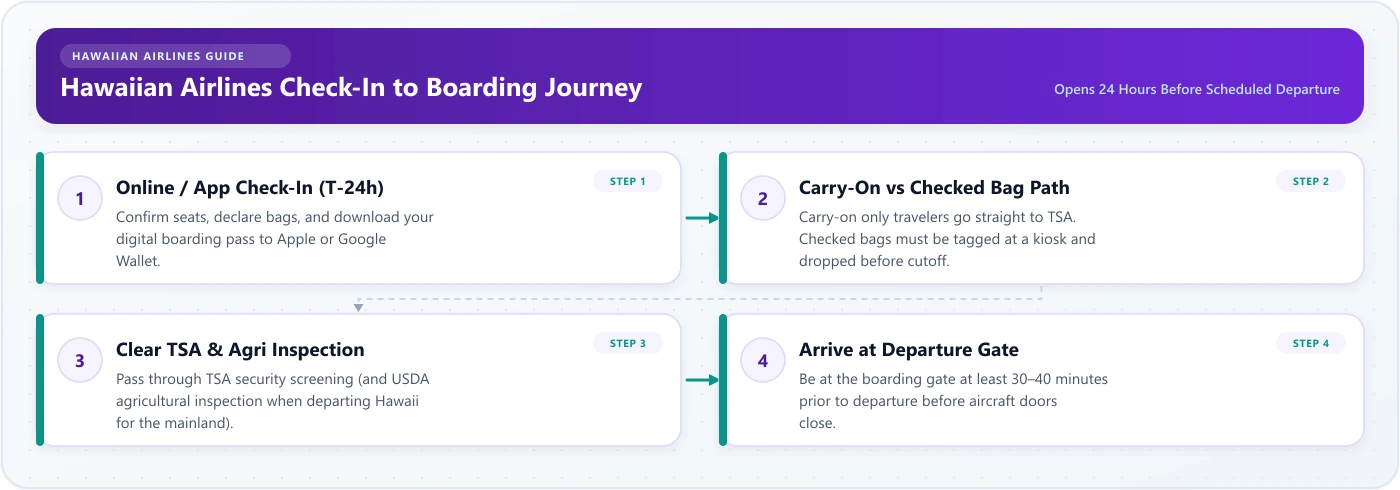
- Boarding Pass Issuance: Your digital pass is saved on your device or printed out.
- Airport Arrival: Arrive with enough time to account for parking, transit, and baggage queues.
- Bag Processing: Drop tagged luggage at designated airline stations before the strict cut-off time.
- Security Screening: Present your boarding pass and government ID at the TSA checkpoint.
- Gate Arrival: Reach your departure gate before boarding commences (typically 30–45 minutes prior to flight time).
How Early Should I Arrive for a Hawaiian Airlines Flight?
Recommended arrival times depend on your departure station, baggage needs, and whether you are flying domestically or internationally:
- Neighbor Island Hawaii Flights: Arrive 90 minutes prior to departure when checking bags; 60 minutes prior if traveling carry-on only.
- Flights Between Hawaii and North America Mainland: Arrive at least 2 hours prior to departure. At major high-traffic airports (such as Honolulu
HNL, KahuluiOGG, Los AngelesLAX, or SeattleSEA), plan for 2.5 to 3 hours, particularly during peak holiday travel periods. - International Flights: Arrive 3 hours prior to scheduled departure to complete passport verification, bag drops, and international customs clearance.
Official Sources & Related Guides
Official Hawaiian Airlines Resources
- Check in directly via the official Hawaiian Airlines Web Check-In Portal.
- Review terminal-specific check-in locations and security updates via the Hawaiian Airlines Airport Guides.
Related Farewander Hawaiian Airlines Guides
- Hawaiian Airlines Baggage Allowance — Checked baggage pricing and carry-on size restrictions during pre-flight check-in.
- Hawaiian Airlines Manage Booking — Modify reservations, change dates, or review itineraries before the 24-hour check-in window opens.
- Hawaiian Airlines Flight Status — Check gate arrival times, operational delays, or terminal notices.
- Hawaiian Airlines Seat Selection — Standard seat assignments versus Extra Comfort upgrades.
- Hawaiian Airlines Cancellation & Refunds — Options for travelers who miss their check-in cut-off or cannot make their flight.
Frequently Asked Questions
You can check in online or through the mobile app up to 24 hours before your scheduled departure time. Airport ticket counters and self-tagging stations generally open 2.5 to 3.5 hours before departure, depending on local station operations.