Copa Airlines check-in is the official step that confirms your presence on the manifest, checks your travel documents, finalizes your seating, and issues your boarding pass. You can check in through the official Copa website, the Copa Airlines mobile app, or directly at the departure airport using self-service kiosks or staffed service desks.
Timing matters because online check-in is only available between 24 hours and 1 hour before scheduled departure, and airport counters enforce strict closing cutoffs. This independent travel guide walks you through every method, explains bag drop rules, covers digital boarding pass acceptance, and troubleshoots common errors so you can head to your gate with confidence.
Editorial Note: Farewander is an independent travel portal and is not operated by, affiliated with, or endorsed by Copa Airlines. Airline check-in rules can change by route, airport, and travel date. Always verify Copa Airlines' current instructions on your reservation before departure.
Copa Airlines Check-In Options at a Glance
| Check-In Option | Availability Window | Best For | What You Need |
|---|---|---|---|
| Web Check-In | 24 hours to 1 hour before departure | Passengers planning from a desktop computer | 6-character reservation code (PNR) or e-ticket number, plus passenger last name |
| Mobile App Check-In | 24 hours to 1 hour before departure | Travelers managing trips on iOS or Android devices | Copa app, booking reference, passport information |
| Self-Service Airport Kiosks | Day of travel (opens up to 3–4 hours prior) | Skipping counter queues at supported hub airports | Reservation code, passport, or scanned mobile pass |
| Staffed Airport Counters | 3–5 hours before flight until 45–60 min before departure | Travelers with paper visa checks, special services, or checked luggage | Physical passport, government travel documents, booking receipt |
How Copa Airlines Check-In Works
Completing check-in signals to Copa Airlines' dispatch and gate systems that you intend to board your flight. During this step, the airline:
- Validates your identification and government travel credentials against immigration databases.
- Assigns or confirms your cabin seat.
- Records any checked bags you want to register or pre-pay.
- Generates your boarding pass (either digitally or as a physical document).
If you fly with only carry-on baggage and receive a valid digital boarding pass, completing check-in online allows you to bypass the airport ticketing lobby completely and head straight through passenger security to your departure gate. However, if you have checked bags or require physical document inspection, you will still visit a counter or baggage drop desk before clearing security.
Comparing Fares for Your Route?
Search live multi-airline schedules, spot discount windows, and baggage fee rules on FareWander.
How to Check In Online With Copa Airlines
Online check-in opens 24 hours before your flight and locks 60 minutes before departure. Follow these practical steps:
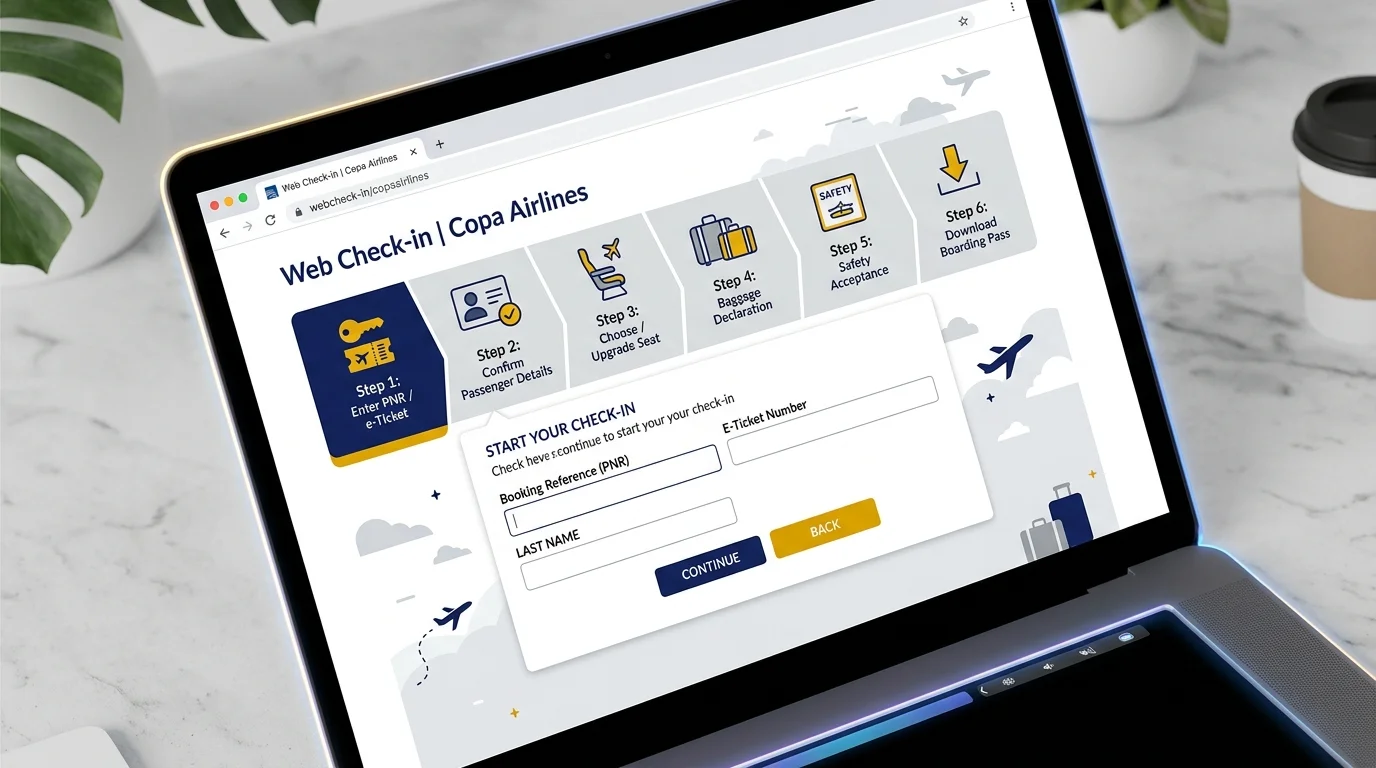
Step 1: Open Copa Airlines' Check-In Page
Navigate to the official Copa Airlines website (copaair.com) from any modern web browser and select the Web Check-In tab located on the primary navigation menu.
Step 2: Enter Your Trip Details
Provide your passenger verification details:
- Reservation Code (PNR): The 6-character alphanumeric code found on your booking confirmation email or receipt (e.g., CM8X2Y).
- E-Ticket Number: Alternatively, enter your 13-digit ticket number starting with airline code 230.
- Passenger Last Name: Enter the primary passenger's surname exactly as shown in their passport.
Step 3: Review Passenger Information
Confirm each passenger in your party. The system will ask you to input or confirm mandatory travel documents: nationality, passport number, expiration date, birth date, and destination address or emergency contact details when required by international entry laws.
Step 4: Choose or Confirm Your Seat
Review the interactive cabin layout. If you previously chose a seat when booking, you can confirm it or view alternative open seats. Depending on your fare rules, standard seats may be complimentary, while premium locations like Economy Extra seats with up to 34 inches of pitch carry a seat fee. If your fare family does not include advance selection, an automatic seat will be allocated.
Step 5: Complete Check-In
Declare the number of bags you plan to check. Pre-paying extra or checked bags online during check-in is frequently discounted compared to paying full counter rates at the airport. Review dangerous-goods regulations, agree to the flight terms, and confirm the submission.
Step 6: Save Your Boarding Pass
Once processed, choose your boarding pass format. You can download a digital pass, send a link to your email or smartphone, save the barcode to your mobile wallet, or print a standard paper copy.
How to Check In Using the Copa Airlines App
The official Copa Airlines mobile application (available for iOS and Android) provides an intuitive mobile check-in workflow:
- Direct Itinerary Integration: If you log into your ConnectMiles frequent flyer profile, booked segments populate automatically under My Trips. Non-members can quickly pull up flights using their reservation code and surname.
- Document Scanner: The app features a passport scanning tool that reads the Machine Readable Zone (MRZ) of your passport booklet, eliminating manual data entry mistakes.
- Wallet Passes: Download boarding barcodes straight into Apple Wallet or Google Wallet, ensuring you can pull up your pass at airport checkpoints without cellular reception or terminal Wi-Fi.
- Live Notifications: App check-in activates push updates regarding boarding gate assignments, departure gate changes, and inbound aircraft tracking.
How to Check In at the Airport
If you prefer to check in at the airport or cannot do so online, Copa Airlines provides both self-service kiosks and traditional ticketing desks:
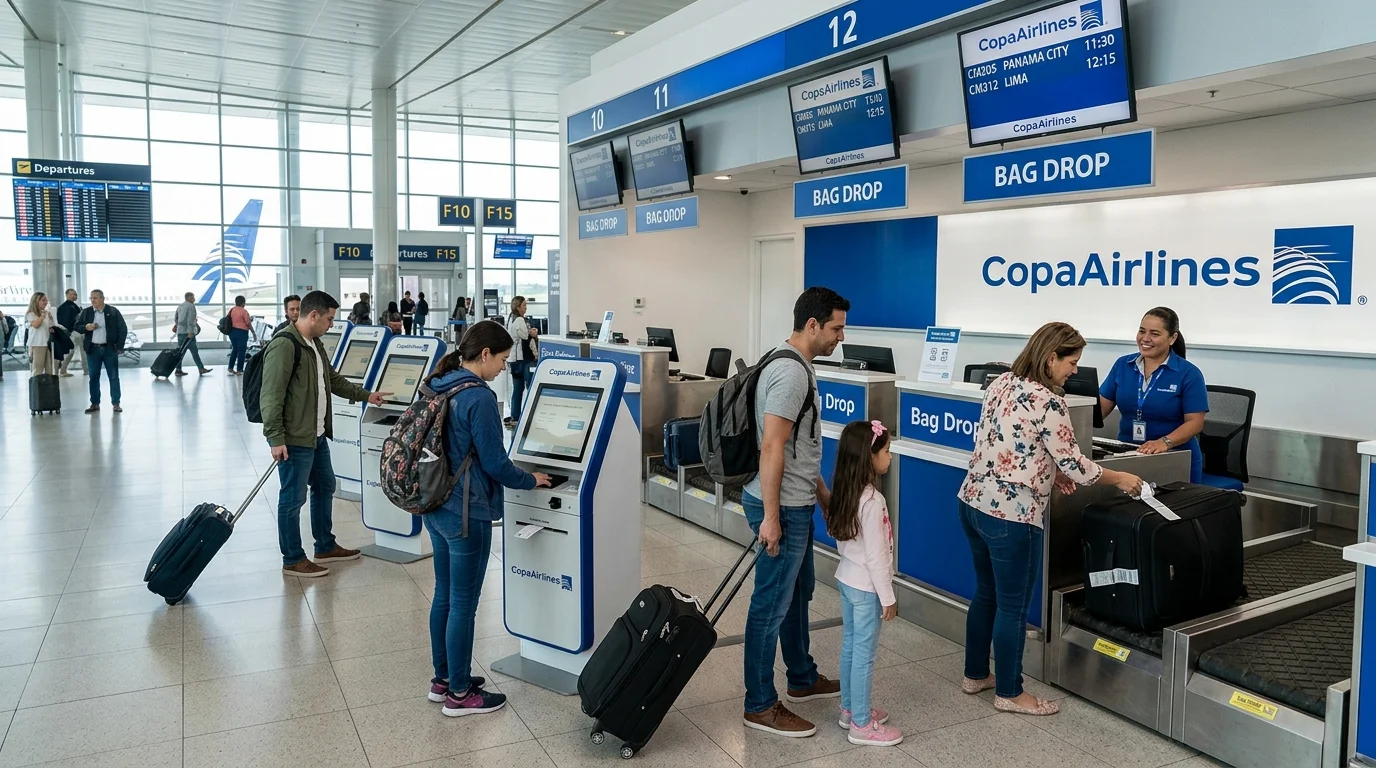
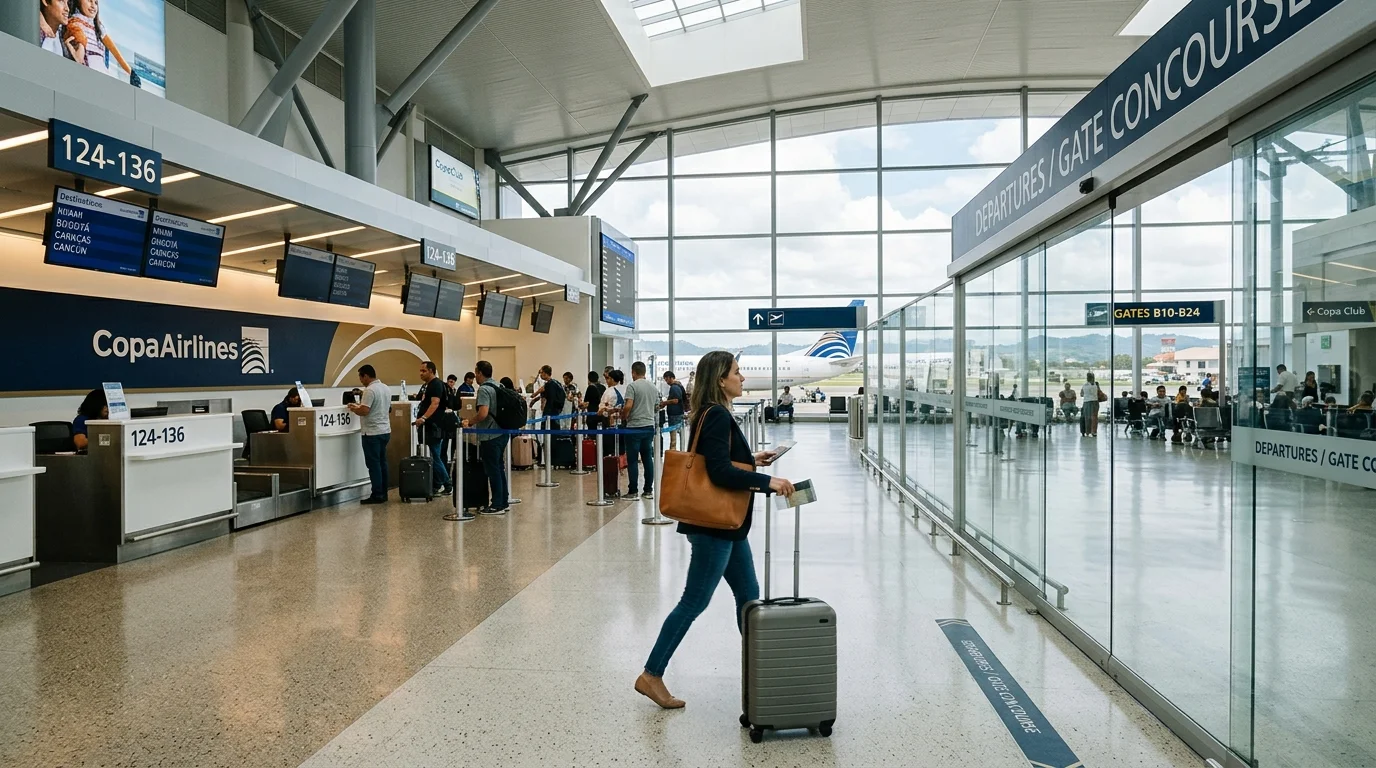
- Locate the Copa Check-In Concourse: Look for Copa Airlines signage at your terminal's international ticketing hall. Look for dedicated lines for ConnectMiles PreferMember/Star Alliance Gold, Web Check-In Bag Drop, and General Economy.
- Use a Self-Service Kiosk (Where Available): Touchscreen kiosks allow you to scan your passport, search by 6-character PNR, change seats, print boarding passes, and print baggage bag-tags at select hub airports.
- Present Identification at the Desk: Hand your passport, onward/return ticket information, and required transit visas to the ticketing agent.
- Weigh and Drop Checked Baggage: Place luggage on the scale to verify size and weight allowances. The agent attaches barcode routing tags directly to your final destination.
- Collect Physical Boarding Passes: Receive printed boarding passes indicating boarding group, sequence numbers, and departure times.
- Pass Security and Go to the Gate: Proceed immediately through passport control and security checkpoints. Arrive at the boarding gate at least 45 minutes prior to departure for international flights.
Planning Travel Logistics?
Use FareWander tools to calculate flight times, luggage rules, and visa requirements.
When Should You Check In for a Copa Airlines Flight?
Check-in windows differ depending on whether you check in digitally or in person at the terminal.
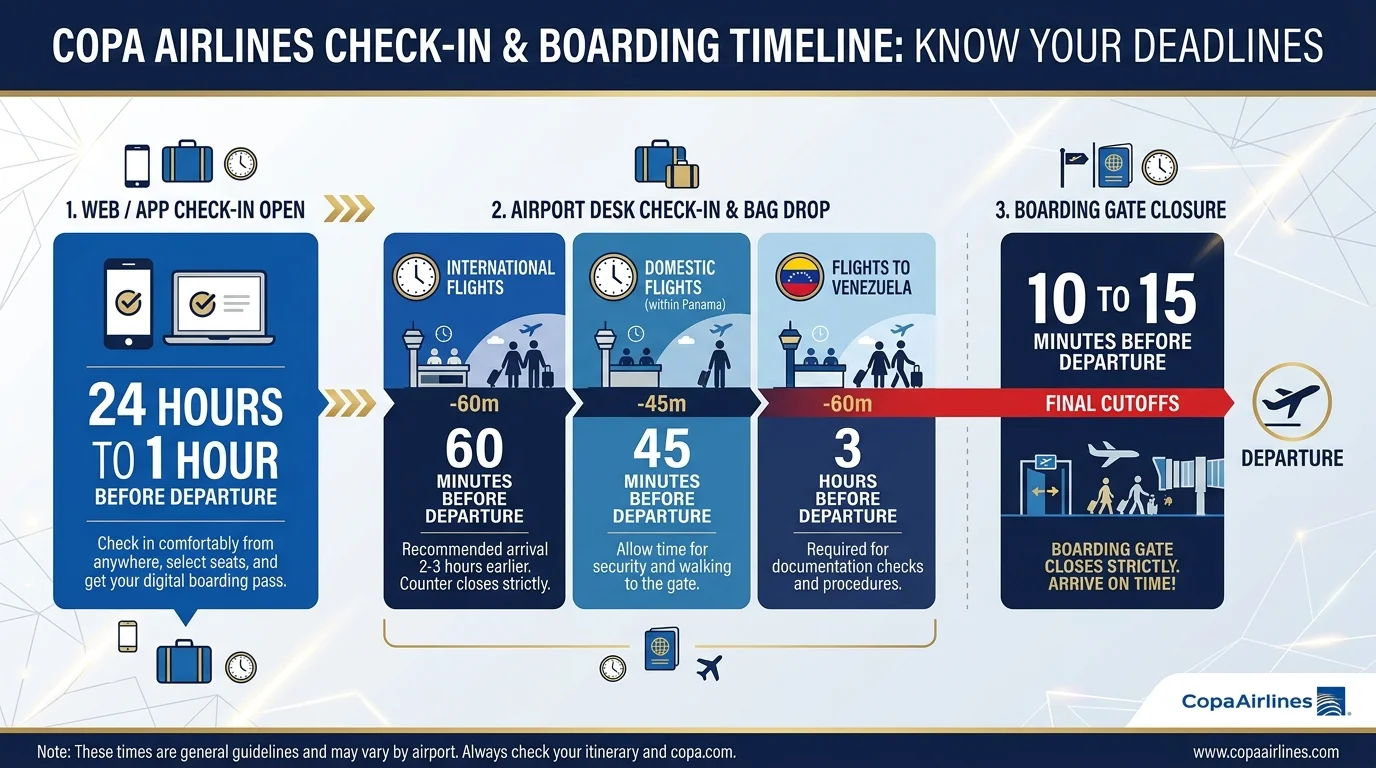
| Flight Itinerary | Online Check-In Opens | Online Check-In Closes | Airport Counter Closes | Recommended Airport Arrival |
|---|---|---|---|---|
| Domestic Flights (Panama) | 24 hours prior | 60 minutes prior | 45 minutes prior | 2 hours before takeoff |
| Standard International Flights | 24 hours prior | 60 minutes prior | 60 minutes prior | 3 hours before takeoff |
| Flights Departing the U.S. | 24 hours prior | 60 minutes prior | 60 minutes prior | 3 hours before takeoff |
| Flights Departing Venezuela | 24 hours prior | 60 minutes prior | 3 hours prior | 4 to 5 hours before takeoff |
| Flights From Lima, São Paulo, Santiago | 24 hours prior | 60 minutes prior | 60 minutes prior | 4 hours before takeoff |
Monitor live incoming aircraft movements with our Copa Airlines Flight Status tracker.
Critical Deadline: Copa Airlines closes boarding doors 10 to 15 minutes before scheduled departure. Passengers arriving after gate closure lose their reserved seat and forfeit flight segments.
What Do You Need for Copa Airlines Check-In?
Keep the following details accessible before initiating check-in:
- Booking Reference or Ticket Number: Your 6-character PNR or 13-digit e-ticket number (prefix 230).
- Valid Passport: Ensure your passport has at least 6 months of validity beyond your intended return date for most international routes.
- Visas or Electronic Travel Authorizations: Such as ESTA for travel via the United States, transit visas, or consular entry stamps.
- Destination Address: Many Latin American and Caribbean nations mandate exact hotel addresses or local residential details before issuing boarding passes.
- Proof of Return or Onward Travel: Immigration regulations require round-trip or onward travel documentation for tourists entering various destination nations.
Copa Airlines Boarding Pass: What Happens After Check-In?
Completing check-in issues your official boarding pass. Depending on the origin airport, Copa issues either mobile barcode passes or requires printed paper documents.
+-----------------------------------------------------------+
| COPA AIRLINES BOARDING PASS SUMMARY                       |
| Flight: CM 472        Gate: 122         Boarding: 14:15   |
| Seat: 14A             Group: 3          Departs:  15:00   |
| Status: Confirmed     Class: Economy    Bags: 1 Checked   |
+-----------------------------------------------------------+
Digital and Mobile Wallet Passes
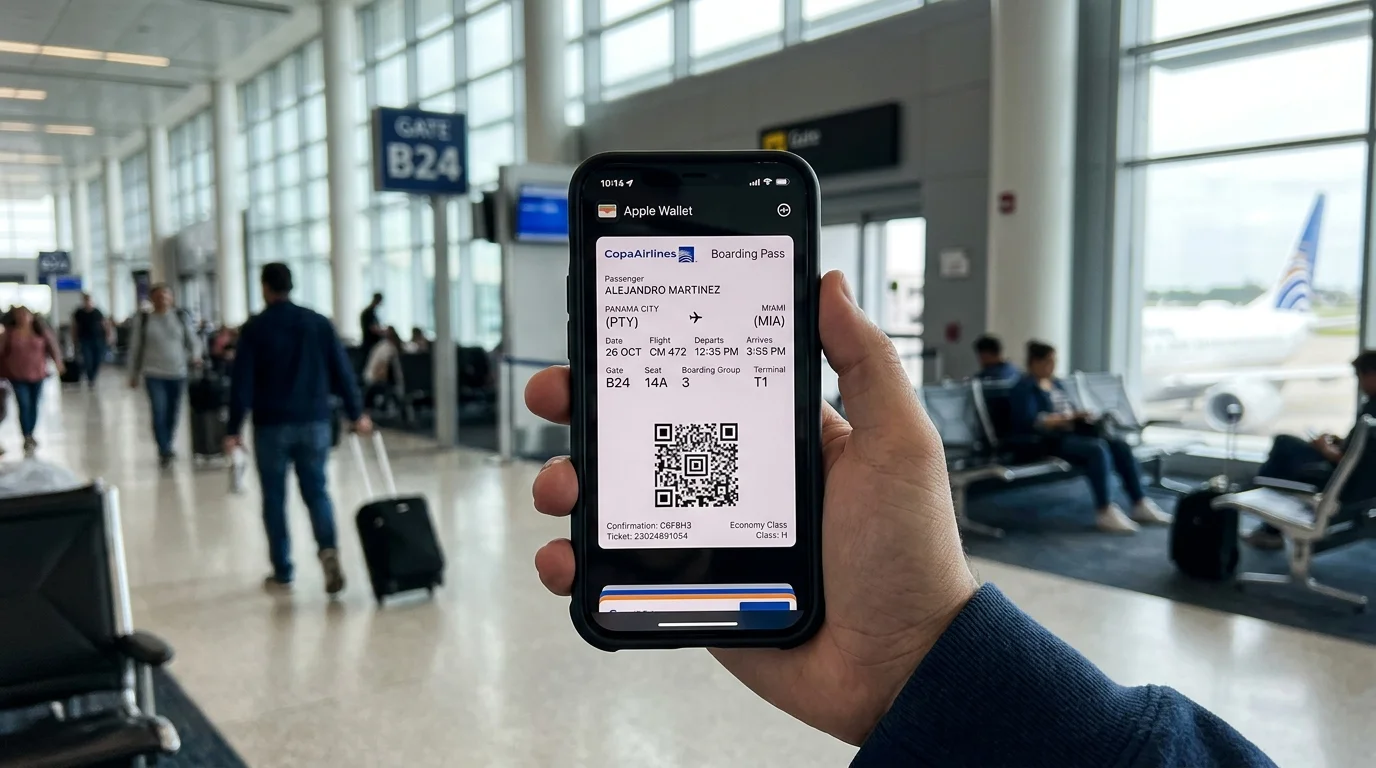
On routes where mobile passes are supported, you can scan the 2D Aztec barcode on your smartphone screen at security gates and aircraft boarding doors. Always save the pass to Apple Wallet or Google Wallet rather than relying on live web links, which may timeout in dead zones.
Airports Requiring Printed Paper Passes
Due to civil aviation security mandates or immigration regulations, certain airports do not accept mobile boarding passes. If your flight departs from any of the following airports, you must show a printed paper pass generated online or printed at an airport check-in desk:
- Augusto C. Sandino International Airport (MGA) – Managua, Nicaragua
- Grantley Adams International Airport (BGI) – Bridgetown, Barbados
- Philip S. W. Goldson International Airport (BZE) – Belize City, Belize
- Simón Bolívar International Airport (CCS) – Caracas, Venezuela
- José Martí International Airport (HAV) & Frank País Airport (HOG) – Cuba
- Lynden Pindling International Airport (NAS) – Nassau, Bahamas
- Piarco International Airport (POS) – Port of Spain, Trinidad and Tobago
- Cibao International Airport (STI) & Gregorio Luperón Airport (POP) – Dominican Republic
- Toussaint Louverture International Airport (PAP) – Port-au-Prince, Haiti
- Venezuelan Regional Airports: Barcelona (BLA), Barquisimeto (BRM), Maracaibo (MAR), Valencia (VLN)
Can You Choose a Seat During Copa Airlines Check-In?
Yes, the interactive seat layout opens during check-in, but fee structures depend on the fare category you purchased:
- Economy Classic & Full Fares: Standard seat selection is included at no extra cost. You can confirm your assigned seat or switch to other open standard seats on the map.
- Economy Basic Fares: Basic fares do not include complimentary advance seat selection. During check-in, you can either purchase an available seat or let the system assign you a seat at random, which typically populates on your boarding pass within 4 hours of departure.
- Economy Extra and Convenient Seats: Passengers looking for up to 34 inches of legroom, dedicated overhead storage, or early deplaning near the front of the aircraft can purchase these upgraded seats during check-in, subject to availability.
For comprehensive details on seating options and fees, see our Copa Airlines Seat Selection guide.
What If Copa Airlines Online Check-In Is Not Working?
If the web or app tool displays an error, work through these diagnostic checks:
| Symptom | Probable Cause | Actionable Fix |
|---|---|---|
| "Reservation Not Found" | Inputting an online travel agency (OTA) booking code instead of Copa's 6-character PNR. | Check your e-ticket receipt for the airline PNR or search using the 13-digit ticket number starting with 230. |
| "Check-in Not Available" | You are outside the 24-hour to 1-hour window. | Verify departure time; the online tool only operates within 24 hours of flight departure. |
| "Document Verification Required" | Immigration rules require manual physical visa or passport inspection. | Complete online steps as far as allowed; present your documents at the airport desk to collect your boarding pass. |
| Page Freezes or Won't Load | Browser cache conflicts or unstable cellular connection. | Clear browser cache, open an incognito/private tab, or switch to the Copa mobile app. |
| Codeshare First Leg Fails | The first flight in your itinerary is operated by a partner airline (e.g., United). | Check in directly through the operating airline's website or app using their reservation code. |
If you cannot resolve the problem online, do not worry. Go to the airport check-in counter 3 hours before departure, where a Copa agent will manually check your travel party in and issue your boarding pass without penalty. If you need to verify or update your booking beforehand, explore our Copa Airlines Manage Booking guide and Copa Airlines Cancellation and Refund policy.
Copa Airlines Check-In for International Flights
Because Copa Airlines connects major international destinations through its central Hub of the Americas at Tocumen International Airport (PTY) in Panama City, international procedures apply to nearly all itineraries:
- Mandatory Passport Validity: Airlines are legally liable if a passenger is turned away by border authorities. Copa agents will verify that your passport meets the destination country's validity requirements (frequently 3 to 6 months beyond travel dates).
- Transit in Panama: Standard international-to-international transfers through Panama City do not require entering Panamanian immigration or collecting checked baggage. However, security screenings occur at gate lounges prior to boarding onward connections.
- Destination-Specific Regulations: Travelers visiting Colombia, Brazil, or the United States must satisfy respective customs declaration portals and biometric data filings before boarding.
Copa Airlines Check-In and Baggage
Checking in online does not mean your baggage is handled. It is vital to separate passenger check-in from baggage acceptance:
Online Check-In (Web/App) ---> Airport Bag Drop Desk ---> Security Screening ---> Gate
- Bag Drop Line: When you reach the airport with checked bags, proceed to the line marked Web Check-In / Bag Drop.
- Strict Bag Cutoff: Baggage drop closes 60 minutes before departure for international flights (3 hours before departure in Venezuela).
- Carry-On Travelers: If you have only a carry-on bag (maximum 22 × 14 × 10 inches and 22 lb / 10 kg) and a personal item, and your departure airport accepts mobile passes, you can proceed directly to security screening.
For detailed rules on size and weight allowances, consult our Copa Airlines Baggage Allowance guide.
Common Copa Airlines Check-In Mistakes to Avoid
- Waiting until the final hour: Attempting online check-in 65 minutes before takeoff leaves no room to resolve passport scan errors or system timeouts before the 60-minute cutoff.
- Assuming a digital pass works everywhere: Skipping the printer when flying out of airports like Managua, Caracas, or Havana leaves you stranded before security checkpoints.
- Arriving late with checked bags: If you complete web check-in but arrive at the bag drop desk 50 minutes before an international flight, agents cannot accept your luggage.
- Entering misspelled names: Passenger names must strictly match the machine-readable line on your passport. Middle names squished into first names are normal on airline tickets, but spelling mistakes prevent check-in.
- Relying on low-battery phones: Always carry a printed confirmation or ensure your phone has sufficient battery charge to display mobile passes at both security and the boarding gate.
Frequently Asked Questions
You can check in online via copaair.com, use the Copa Airlines mobile app, or check in at the airport via self-service kiosks or staffed desks. Online and app check-in are accessible starting 24 hours before flight departure.
Final Takeaway
Copa Airlines makes checking in straightforward across web, app, and airport channels. Taking advantage of the 24-hour web check-in window lets you lock in seats early, download mobile boarding passes, and bypass lines if traveling light. If you have checked luggage or depart from an airport that requires physical paper passes, budget at least 3 hours at the airport to ensure a smooth transition from bag drop to your departure gate.
Internal Linking Plan
- Copa Airlines Baggage Allowance guide – Context: Place within the Copa Airlines Check-In and Baggage section when explaining carry-on dimensions and checked weight limits.
- Copa Airlines Seat Selection guide – Context: Place within the Can You Choose a Seat During Copa Airlines Check-In? section when detailing Economy Extra vs. standard seat features.
- Copa Airlines Manage Booking guide – Context: Place within the What If Copa Airlines Online Check-In Is Not Working? section when explaining how to correct passenger contact details or find your PNR before the 24-hour window.
- Copa Airlines Flight Status tracker – Context: Place within the When Should You Check In for a Copa Airlines Flight? section to help travelers monitor incoming aircraft delays before driving to the terminal.
- Copa Airlines Cancellation and Refund policy – Context: Place within the troubleshooting section for passengers who are unable to check in due to cancelled or suspended flights.